Payments in Salesforce
How to read what a payment leaves on your records, and how the package decides who paid, how much, and what it was for.
Overview
Flourish Payments adds no custom objects. Each payment lands on an Opportunity, and everything Stripe reports about it is written back onto that Opportunity. Where your org already has payment records, the package uses those rather than inventing its own.
A payment can arrive in several ways:
- through a payment form on your website;
- through a payment link;
- as an invoice;
- as a subscription's payment;
- as a charge to a card saved earlier.
Invoices, subscriptions and payment links have their own page, Products, invoices and subscriptions. This page covers what they all have in common.
Reading a payment on the record page
Two read-only components go on the Opportunity record page; see Setup.
| Component | What it shows |
|---|---|
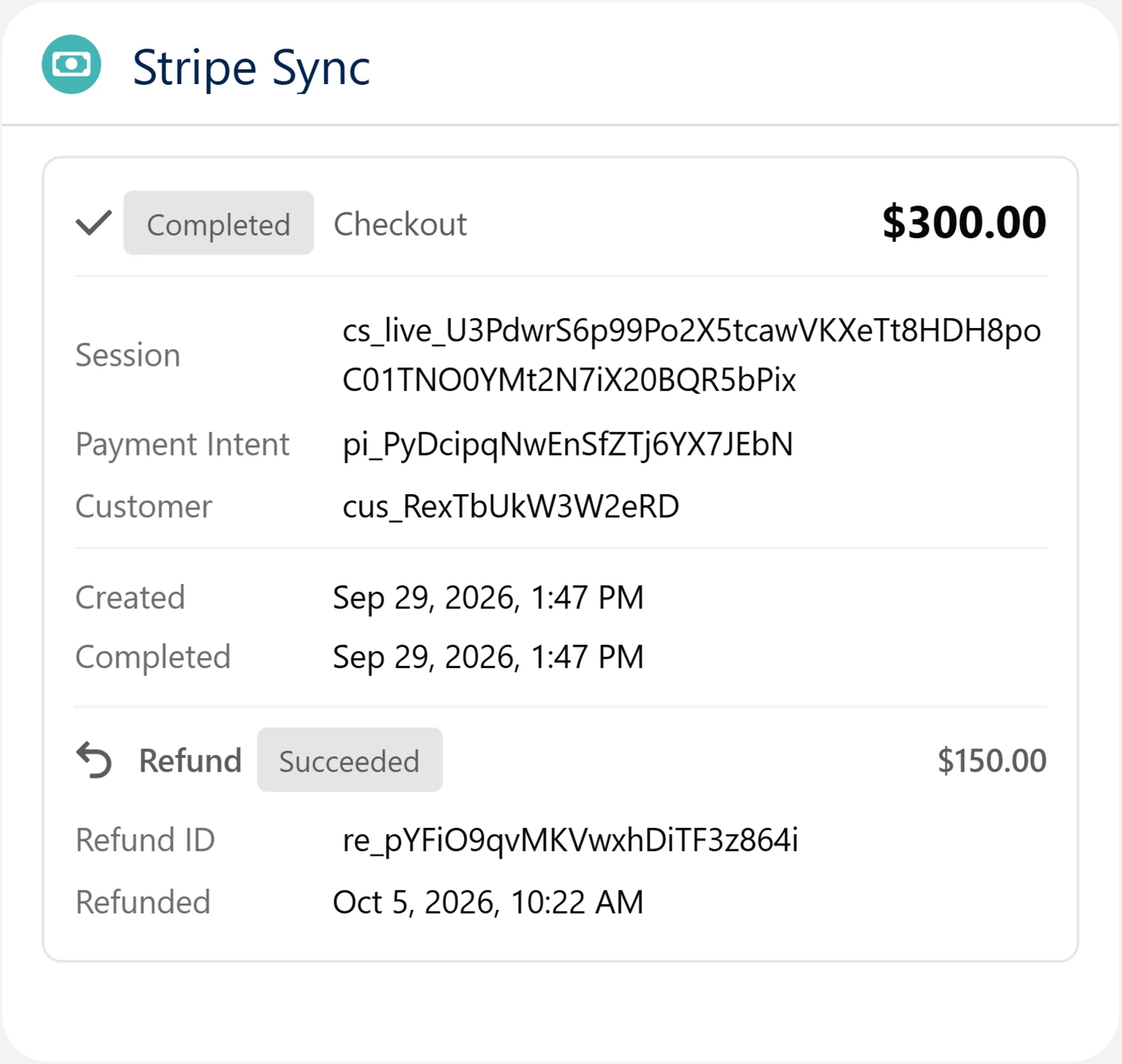
| Flourish Payments: Stripe Sync Viewer | The subscription this Opportunity started, if any, then one card per payment. Each card shows the source, amount, status and Stripe IDs. An invoice's card adds its number and a link to pay it. A refunded payment adds the refund's ID, amount and date. |
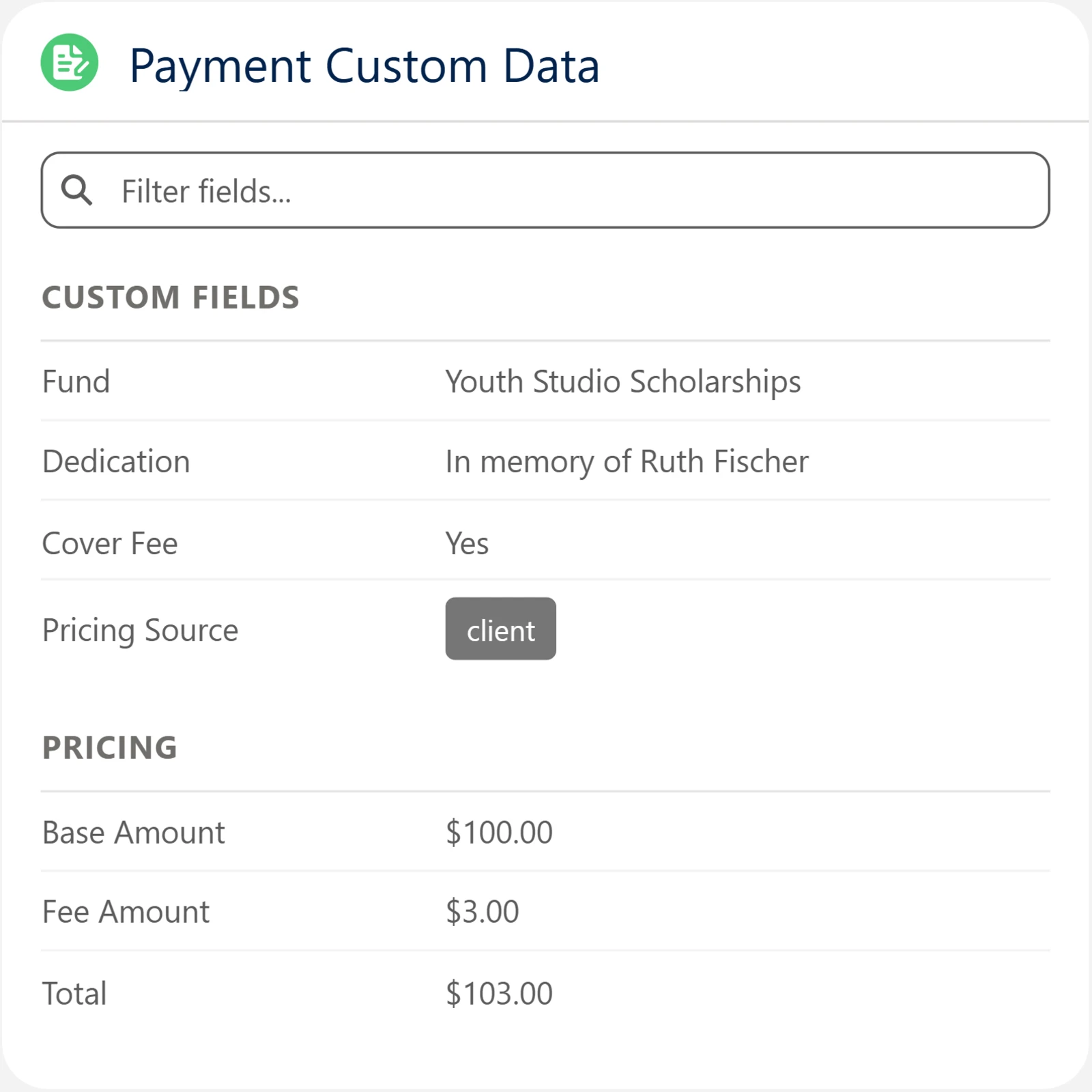
| Flourish Payments: Custom Data Viewer | Everything the form collected that isn't a standard payment field, plus how the charge amount was decided. Amounts show as currency. |
Each payment card names its source: Checkout, Invoice, Subscription payment or Payment link.
| Status | Meaning |
|---|---|
| Pending | Started, with no result yet. An invoice waiting to be paid shows here, with a note if a payment attempt failed. |
| Processing | A bank payment that's still clearing. |
| Completed | Paid. The amount shown is what Stripe charged. |
| Failed | The payment didn't go through. |
| Expired | The customer never finished the checkout and Stripe closed it. |
| Refunded | Refunded in full. A partial refund leaves the payment Completed and shows the refunded amount on the card. |
| Void | An invoice you voided in Stripe. |
| Uncollectible | An invoice you marked uncollectible in Stripe. |
Both components are read-only on purpose. Nothing on an Opportunity should be edited to change a payment; Stripe is what happened, and these fields are the record of it.
The fields
On the Opportunity:
| Field | API name | What it is |
|---|---|---|
| Stripe Sync | pay_Stripe_Sync__c | The payment history and any subscription for this Opportunity, as JSON. Written by the package. Never edit it by hand. |
| Payment Custom Data | pay_Custom_Data__c | Everything the form collected that the package doesn't handle itself, as JSON, plus the pricing breakdown. |
| External Ids | pay_External_Ids__c | An index the package uses to match an inbound Stripe event back to this record. Internal bookkeeping. |
| Payment Model | pay_Payment_Model__c | How the form should collect payment for this Opportunity. See below. |
| Initial Stripe Checkout Datetime | pay_Initial_Checkout_Completed_DT__c | Stamped once, on the first checkout that gets past pending. This is the field that tells you a record came through a payment form rather than being entered by hand. |
| Subscription Opportunity | pay_Subscription_Opportunity__c | On a subscription's renewal payment, the Opportunity the subscription started from. The starting Opportunity lists them under Subscription Payments. |
On the Contact:
| Field | API name | What it is |
|---|---|---|
| Stripe Customer ID | pay_Stripe_Customer_Id__c | The Stripe customer this person is. Filled in from their payments. |
On the Product:
| Field | API name | What it is |
|---|---|---|
| Stripe Sync | pay_Stripe_Sync__c | The product's Stripe ID, its prices and its payment links, as JSON. Written by the Flourish Payments: Stripe Product card. |
Who the payment gets attached to
The Contact.
- Matching: by email address. If several match, the oldest is used, and if none do, one is created.
- Blank fields on that Contact are filled in from the form; fields that already have values are left alone.
- Stripe Customer ID: filled in from the Stripe customer a payment uses, and a later payment can replace it with a newer one. Stripe customers aren't merged, so a person who pays several times can have several in Stripe, all belonging to the same Contact.
The company. If the form collected a company name, an Account is matched by exact name, oldest first, or created. The payer is then linked to it:
- On NPSP: with a primary affiliation. The Contact stays in their household.
- In other orgs: the Account becomes the Contact's Account, if the Contact doesn't have one already.
The Opportunity gets the Account either way.
The Opportunity.
- Name: built from the item, the payer and the date.
- Stage: comes from Default Opportunity Stage if you set one, and otherwise from the first open stage in your org.
- Record type: comes from Opportunity Record Type if you set one.
- Time zone: Opportunities created from payment forms, payment links and subscription renewals are dated in the time zone of your connector site's guest user. Set that user's time zone to your org's, so a payment made late in the evening isn't dated the next day.
Payment models
By default a payment form asks the customer for an amount, which suits donations and memberships. Set Payment Model on an Opportunity instead, and a form opened for that Opportunity collects against what's already on the record.
| Payment Model | What the customer sees |
|---|---|
| Opportunity Only | The Opportunity's amount, read only. |
| Summed Payments | The related payment records as read-only line items, with the total. |
| Selective Payments | The same line items as checkboxes, all ticked to start. The total follows what's ticked. |
| Dynamic Payments | An amount to enter per line item, up to what's still owed on each. |
Leave the field blank for a form that asks for an amount.
Paying an existing Opportunity
Send a customer to your payment page with the Opportunity ID in the URL, and the form opens against that record instead of creating a new one:
https://example.com/pay?flpayoid=006xx000000abcd
| Parameter | What it does |
|---|---|
flpayoid | The Opportunity to pay. The form loads its payment model, its amount and its payment records. |
flpaypid | Optional. A payment record on that Opportunity. It's checked against the Opportunity; what's charged still comes from the payment model. |
flpayoid accepts a proxy ID as well as a Salesforce ID. If the Opportunity carries a toflourish__Lim_Order_Id__c value, that value works in the URL too, so a system outside Salesforce can send someone to pay using the reference it already holds.
The page has to be built for this: see Payment widget.
What ends up in Payment Custom Data
The package handles these payload keys itself, and they don't appear in Payment Custom Data:
opportunityId, paymentId, paymentModel, customerId, email, firstName, lastName, companyName, amount, baseAmount, feeAmount, paymentCurrency, itemName, itemDescription, quantity, mode, returnUrl, clientReferenceId, collectPhoneNumber, metadata, selectedPaymentIds, paymentAmounts, setupFutureUsage, priceId, interval, intervalCount
Every other field your form collects is written to Payment Custom Data as it arrives. A form that asks for a fund, a dedication or an employer match needs no Apex and no configuration: add the field to the form and the value is on the Opportunity. Read it out in Flow with Get Custom Data Value.
Alongside the form fields, the package writes pricing, the breakdown behind the amount, and pricingSource, which says how the amount was decided: flow, records, client or price.
Server-side pricing
The form shows the customer a price, but Salesforce decides what's charged before Stripe is called. In this order:
- Pricing Flow. If Pricing Flow Name is set, that Flow decides the amount outright.
- Payment model. If the Opportunity has a Payment Model, the amount comes from the record: the Opportunity's amount, or the sum of the selected payment records, with each entered amount checked against the balance still owed.
- The submitted amount. For a donation or membership form, the amount the customer chose.
A fee the customer opted into is added on top of whichever of these applies, and is never counted twice.
A form that sells a Stripe price works differently: the price is the amount, and Stripe charges what it says.
Writing a pricing Flow
Build an Autolaunched Flow and put its API name in Pricing Flow Name.
| Direction | Variable | Type | Notes |
|---|---|---|---|
| Input | payload | Text | JSON of everything the form submitted. |
| Output | amount | Number | Required. The total to charge, in dollars. |
| Output | pricingBreakdown | Text | Optional. JSON kept on the Opportunity in Payment Custom Data. |
The Flow has full authority: whatever it returns is what Stripe charges. Use it for rates looked up from another object, tiered discounts, proration, or an org-specific minimum.
Orgs with payment records
The package works out what your org has and adapts, with nothing to configure.
| Org | What it uses |
|---|---|
| NPSP | The NPSP Payment object. Unpaid payments are what a payment model offers, and a completed checkout marks them paid. A payer's company is linked by affiliation. |
| Nonprofit Cloud | The standard Payment object. Payments not already paid are offered, and a completed checkout sets their status to Paid. |
| Anything else | The Opportunity alone, with no payment records. |
What the webhook changes
Stripe reports each outcome to your org, and that report is what moves the record.
| Stripe event | What happens |
|---|---|
checkout.session.completed, paid | Payment marked Completed with the amount Stripe charged, Opportunity set to Closed Won, payment record marked paid. For a subscription, the subscription is recorded too. For a payment link, the Opportunity is created first. |
checkout.session.completed, not yet paid | Payment marked Processing, for methods that settle later such as bank debits. Nothing else moves yet. |
checkout.session.async_payment_succeeded | As above, for a payment that has now cleared. |
checkout.session.async_payment_failed | Payment marked Failed, Opportunity set to Closed Lost. |
checkout.session.expired | Payment marked Expired. The Opportunity is left where it is. |
charge.refunded | The refund's ID, amount and date are recorded. A full refund marks the payment Refunded, sets the Opportunity to Closed Lost, and unmarks the payment record as paid. A partial refund records the amount and changes nothing else. |
invoice.paid | An invoice's payment marked Completed and its Opportunity set to Closed Won; or a subscription payment recorded (see Subscriptions). |
invoice.payment_failed | The failed attempt is noted on the invoice's payment, or on the subscription. |
invoice.voided, invoice.marked_uncollectible | The invoice's payment marked Void or Uncollectible. The stage doesn't change. |
customer.subscription.created, .updated, .deleted | The subscription on its Opportunity is kept current: status, price, next payment date, cancellation, and Canceled when it ends. |
If the customer opted to save their card, the webhook is also where that card is captured: the reusable token is stored on the Opportunity and the Contact's Stripe Customer ID is filled in. Charging it later is Flow actions.
A payment stuck at Pending long after the customer paid means the webhook isn't arriving. Check the endpoint's delivery attempts in the Stripe dashboard against Setup.
If a record write fails while a customer is checking out, the checkout still goes through: the customer is never blocked by a Salesforce error.